If GA4 or GTM stopped recording events after a theme update, plugin change, consent banner install, or migration — this is a fixed-scope repair that restores working tracking with proof.
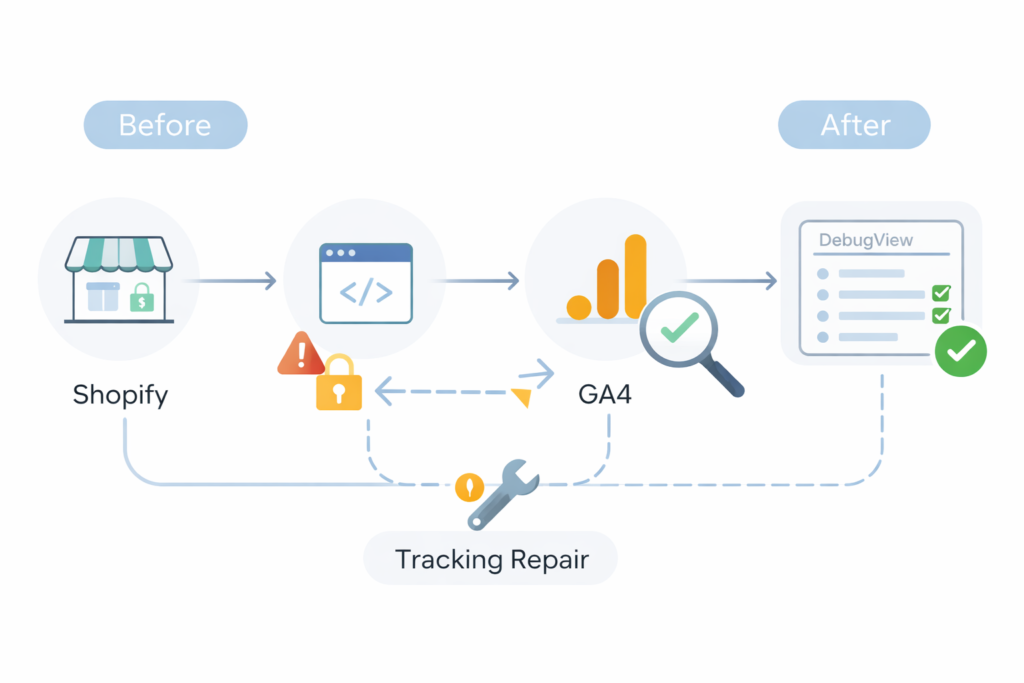
Flat rate repair: $499 USD
You’ll get:
- The exact cause identified
- One primary conversion repaired
- Before/after verification in GTM Preview + GA4 DebugView
No rebuild. No vague audit. No upsell.
Common symptoms: GA4 not tracking, GTM not firing,
conversions disappeared after a plugin/theme change.
Flat-rate, fixed scope. See pricing ↓
What this service is
A fixed-scope repair for websites where Google Analytics 4 (GA4) and/or Google Tag Manager (GTM) is installed — but tracking is missing, inconsistent, or clearly wrong.
You’ll get a clear diagnosis, a targeted repair, and proof that your primary conversion is firing correctly.
This is not a full analytics rebuild or custom event architecture project.
Who this is for
This is for you if:
- You rely on GA4 to measure leads or sales — and it’s currently untrustworthy
- You recently migrated to GA4, changed themes/plugins, or added a consent banner
- You have GTM installed, but tags/triggers don’t fire consistently
- You want a simple “working / not working” answer with proof (DebugView + GTM Preview)
Common symptoms (search-intent mirror)
- “GA4 not tracking” / “GA4 not recording conversions”
- “GTM not firing” / “Tag Assistant shows nothing”
- Pageviews look too low, too high, or duplicated
- Events show in GTM Preview but not in GA4
- Conversions disappeared after a redesign or plugin change
- Consent banner enabled and tracking dropped sharply
- Multiple GA4 tags, multiple containers, or conflicting plugins
What you get (deliverables)
You’ll receive:
- Cause identified (what prevented tracking from firing)
- Repair of one GA4 or GTM configuration issue preventing the primary conversion from recording
- Before / After screenshots (GTM Preview + GA4 confirmation)
- Setup + verification of ONE primary conversion event (choose one):
- A) Lead form submit (WordPress form), or
- B) Primary CTA click (if you use Google Forms or embedded forms)
Proof it’s working:
- GTM Preview / Tag Assistant verification
- GA4 DebugView + Realtime validation steps
Handoff note (short + clear):
- What I changed
- What to avoid (duplicate tags, plugin conflicts, common consent pitfalls)
What’s included vs excluded (scope boundaries)
Included
- One website
- One GA4 property
- One GTM container
- One primary conversion event
- If your site uses embedded third-party forms, submit tracking may not be reliable.
In that case, the tracked conversion is the primary CTA click, not the submit event. - Verification via DebugView/Realtime + a reusable checklist
Excluded (important)
- No guarantee of perfect attribution (ad blockers, consent, iOS/browser privacy, cookie limits)
- No server-side tracking, custom code, custom dataLayer work, or theme editing
- No full analytics strategy, dashboards, BigQuery, or attribution modeling
- No ads campaign setup (Google Ads/Meta) unless you choose the add-on
- No ecommerce funnel instrumentation unless scoped separately
How the repair works
- Purchase the repair service.
- Complete the short intake form so I can review your setup.
- Grant the minimum access required (GA4 / GTM).
- I diagnose and repair the tracking issue.
- You receive verification proof via GTM Preview + GA4 DebugView.
Pricing
Most tracking failures are resolved within this fixed scope.
Flat Rate — $499 USD
Fixed Scope GA4 / GTM Repair
Optional add-on: +$199 USD — Ads + Extra Conversion Pack
- Add one additional conversion event (total = 2), and/or
- Basic Google Ads conversion linking verification (not campaign setup)
If no measurable tracking issue is found within the service scope, you receive a full refund.
Not sure if this is the right service?
Run Free GA4 Diagnostic →
Common symptoms: GA4 not tracking, GTM not firing, conversions disappeared after a plugin/theme change.
What I need from you (access list)
Minimum access (you can revoke after)
- GA4: Viewer or Editor access to the correct property
- GTM: Access to the correct container (Publish permission preferred)
- WordPress: Admin access OR access to the plugin settings controlling GA/Tag Manager
- Consent banner/CMP (if used): Access to settings (or screenshots)
Optional (helps speed)
- A test lead / test purchase path you want tracked
- Screenshots of what looks wrong (GA4 reports, Tag Assistant, etc.)
Limits & disclaimers (read this)
- Tracking is affected by consent, ad blockers, browser privacy protections, and cookie restrictions.
- I will make your setup correct and verifiable — but I do not promise perfect attribution or 100% capture.
- If your site uses embedded third-party forms (including Google Forms), “submit” tracking may not be reliable without platform-specific support. In that case, I’ll track the primary CTA click or recommend a WordPress form for true submit tracking.
FAQ
Q: Can you fix “GA4 not tracking” today?
A: If access is granted quickly, diagnosis often happens the same day.
Typical turnaround: 2 business days.
Q: Will you guarantee my conversions match my CRM exactly?
A: No. I’ll make tracking correct and verifiable, but perfect matching isn’t guaranteed due to privacy/consent/ad blockers and cross-device behavior.
Q: Do you work with WordPress + GTM?
A: Yes — this service is specifically for GA4 + GTM setups on WordPress sites.
Q: My form is Google Forms — can you track form submissions?
A:If your lead capture is Google Forms (or another embedded third-party form), I’ll track the primary CTA click that opens the form (reliable). If you want true “submit” tracking, I recommend a WordPress form.
Q: What if I have multiple forms or multiple conversions?
A: The base service includes 1 conversion. Use the add-on for an extra conversion, or scope a larger setup.
Q: What do you need from me?
A: GA4 + GTM access (and WordPress/plugin settings if needed). The minimum list is above.
What happens next
After you submit the intake form, I review the details and begin diagnosing the tracking issue.
Service delivery
All services are provided directly by the site operator, based in Japan.
No subcontractors. Clear scope. Documented outcome before handoff.
Operational context
This service is part of Operational Memory — fixed-scope interventions for system failures where continuity matters more than optimization.
If your issue is indexing-related rather than tracking-related, see:
Search Console Indexing & Error Fix

© 2026 Operational Memory · Privacy Policy · Terms of Service · Specified Commercial Transactions Act